

If you use Claude Code or GitHub Copilot every day, you’ve probably caught yourself typing the same few lines again and again. “We use pnpm, not npm. Tests run with pnpm test. Don’t touch the generated folder. Follow the error format in api/errors.ts.” New chat, same speech.
So where should that text live?
Remember that the model remembers nothing between calls. If it’s going to know your build command, someone has to send it on every request. The only question is who does the typing, you or the app.
Reusable instructions
Every app you use has a place for this. ChatGPT has custom instructions in its settings, and they apply to all your chats. Coding tools use a file in the repository. Claude Code reads CLAUDE.md at the start of every session. GitHub Copilot reads .github/copilot-instructions.md and adds it to the requests you make in that repository. And there is AGENTS.md, a plain format meant to work across tools. Copilot, Codex, Cursor, Gemini CLI and many others read it, Claude Code can read it too, and it’s now looked after by the Agentic AI Foundation under the Linux Foundation, so no single vendor owns it.
If you’ve done backend work, this is a config file. You check the settings into the repo and the whole team gets the same behaviour.
Two things are easy to miss, though.
The first is that nothing enforces this file. Claude Code’s docs say the model treats CLAUDE.md as context, and Claude Code actually delivers it as a message after the system prompt. If something must never happen, like pushing to main, that belongs in permissions or hooks, which the harness enforces whatever the model decides. As we saw in article 01b, the model proposes and the harness decides.
The second is cost. The file goes into every request, so you pay for every line of it on every turn, and long files get followed less well. Claude Code suggests keeping each file under about 200 lines. Treat it like code. Version it, review changes to it, and delete what’s stale.
When the file keeps growing
Then it grows anyway. Someone adds the release checklist. Someone adds the twelve steps for a database migration.
Here’s a question. You release once a week. Why should the model read your release checklist on every single turn of every session?
It shouldn’t. And this is exactly why skills exist.
A skill is a folder with a SKILL.md file in it. At the top of that file is a short name and a description of when to use it. Below that are the instructions. The folder can also hold scripts, reference docs and templates.
The trick is in how it loads. When a session starts, the agent loads only the name and description of each skill. When your task matches a description, it reads the full instructions. If those point to a script or a reference file, it opens that only when it needs it. The Agent Skills docs call this progressive disclosure. You can keep many skills around and pay almost nothing for the ones you don’t use.
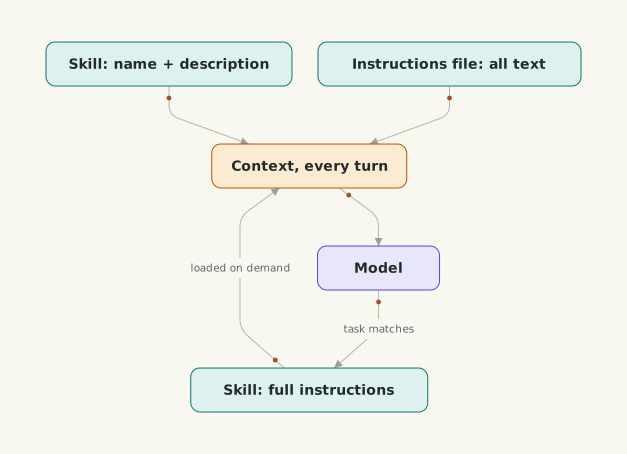
What sits in context all the time, and what loads only when needed?
You know this pattern too. It’s lazy loading. You ship a small index of what exists and fetch the details on demand, instead of loading the whole catalogue at startup.
Skills started at Anthropic and were released as an open standard, Agent Skills, at agentskills.io. Claude Code, GitHub Copilot, OpenAI’s Codex, Gemini CLI and Cursor are among the many tools that support it, so a skill you write for one usually works in the others.
One security point. A skill can bundle scripts, and the agent may run them. Installing someone’s skill is installing their code, so read it first, the way you’d read a shell script before piping it into bash.
When is a skill the wrong choice? If every session needs it, like the build command, keep it in the instructions file. And if you need it once, just say it in the chat.
Tools
Instructions and skills shape what the model knows and how it works. On their own, they don’t connect it to anything. The model still can’t look up a Jira ticket or query your staging database.
So how does a model that only produces text do anything at all?
It asks. A tool is a function you describe to the model. In the request you send its name, a description of what it does, and a JSON schema for its inputs. If the model decides it needs it, it doesn’t answer in prose. It replies with a tool call, the tool’s name and the arguments, and the response says it stopped because it wants to use a tool. That’s the “why it stopped” field from article 02a. Your code runs the function, and you send the result back in the next request. The model reads it and carries on, maybe calling another tool, until it can answer.
Anthropic and OpenAI both describe the same loop, and both are clear that your application runs the function, not the model. If you’ve used RPC, it’s a remote call where the other side only says which function and with what arguments, and you decide whether to make the call at all. That’s where approvals and permissions live. Some providers also run a few tools for you on their side, like web search, but the shape is the same.
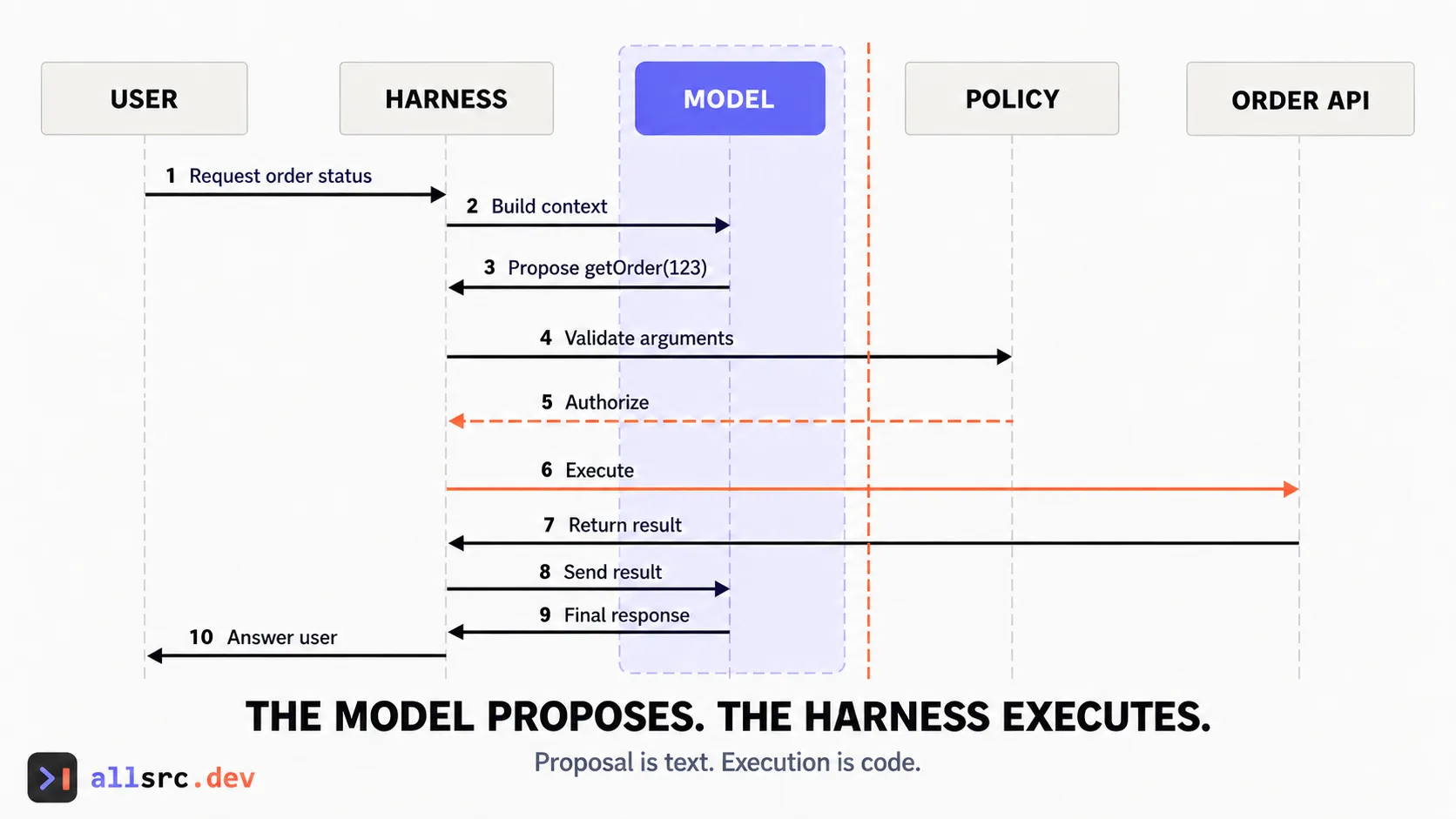 The model proposes a call; the harness controls every external effect.
Now remember the stateless call. Tool definitions go into every request too. OpenAI’s docs say function definitions count against the context limit and are billed as input tokens. They also suggest keeping fewer than about 20 functions available at the start of a turn.
Don’t reach for a tool when the data is small and known up front. Put it in the prompt. And if the steps are fixed, write a normal function in a workflow, as we saw in 01b.
Tool definitions are prompts too
The model picks a tool and fills in its arguments using only what you wrote in the definition. Anthropic’s tool docs say detailed descriptions are by far the most important factor in tool performance. So write them like API docs for a reader who takes every word literally. Say what the tool does, when to use it and when not to, and what each parameter means. Use enums where you can, and return only what the model needs next.
I wrote about the common mistakes, like tools that return 40,000 tokens or errors that don’t say what to do next, in Your Tool Definitions Are Prompts, And Most Are Bad Ones.
So here are the three, by when they load.
| When it’s in the context | Use it for | |
|---|---|---|
| Instructions file | every request | facts every session needs |
| Skill | name always, the rest when relevant | procedures you need sometimes |
| Tool | the definition every request, the result when called | doing something outside the model |
Next: what happens when you connect fifty tools from five different services, and the standard, MCP, that makes connecting them easy.