

Here’s something you may have done without thinking about it. You’re deep into a long session in Claude Code, or a long chat in ChatGPT or GitHub Copilot. The answers aren’t great, so you open the model picker and switch to a bigger model. The next reply takes noticeably longer to start. If you’re paying per token, that one turn also costs more than the ones before it.
Same conversation, same files. So why did it get slower?
Remember from the last article that the model remembers nothing. Every turn, the app sends the whole conversation again. On a long session that’s a lot to process before the first word of the answer.
Providers don’t want to redo that work every turn, so they cache it. When a request comes in, the provider checks whether the start of it, the prefix, is the same as something it processed a few minutes ago. If it is, it reuses the work it already did on that prefix and only processes the new part at the end. OpenAI’s docs describe what’s stored as the model’s intermediate key-value state, not the text itself. You get a cheaper, faster turn.
Now think about what that cached state is. It was computed by one model’s weights. A different model can’t use it. Claude Code’s docs say each model has its own cache, and that after you switch, the next request reads the entire history with no cache hits, even though the content is identical. Claude Code even asks you to confirm a switch while the cache is still warm.
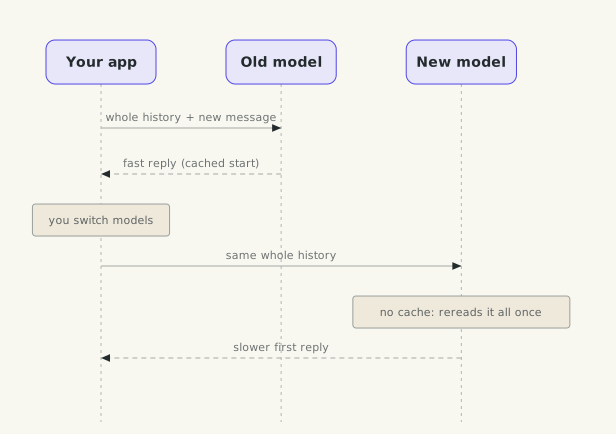
Why is the first reply after a model switch slower?
If you’ve built caches, you know this one already. The model is part of the cache key. Change the key and every lookup misses. The same thing happens when anything near the start of the request changes, such as the system prompt or the list of tools, because everything after that point is now a different prefix. This is why the stable system prompt from Part 2 matters so much.
There’s a second effect besides speed. The new model reads a conversation written by another model and carries on as if those replies were its own. It has a different style and different habits, so the behaviour shifts too.
For the details, Anthropic’s prompt caching and OpenAI’s
prompt caching pages explain it well, and Claude Code has a
page on what breaks its cache. When shouldn’t you worry about it? On short chats, and after a long break, because the cache expires after a few minutes of inactivity anyway. Switch freely then. On a long task, pick your model at the start.
While we’re inside the conversation, here are a few words you’ll keep hearing.
Latency. How long you wait. The number people watch most is time to first token, how long before the answer starts streaming, and that’s exactly what the cache miss above made worse. Long answers also take longer, because output tokens are generated one at a time.
Hallucination. The model says something false with full confidence, like a function that doesn’t exist in your library. Anthropic’s own docs say the techniques to reduce it don’t eliminate it, so check anything that matters.
Grounding. Giving the model the real source (your file, the docs, a search result) and asking it to answer from that. It’s the main defence against hallucination, and later the whole reason for retrieval.
Temperature. A setting for how much randomness goes into picking each token. Lower is more predictable, higher is more varied. Even at zero the output isn’t fully deterministic, and some newer models don’t let you change it at all. Treat a model like a flaky test and run it more than once before you trust a pattern.
Thinking. Many models can reason for a while before answering. It usually helps on hard problems, but those thinking tokens are billed as output and they add latency.
Sycophancy. The model agrees with you because you sounded sure, even when you’re wrong. In 2025 OpenAI rolled back a ChatGPT update because it had become too flattering. If you want a real review, ask it to find problems.
Prompt injection. Text that the model reads, in a web page, a file or a tool result, that tries to give it new instructions. The model can’t reliably tell your instructions from someone else’s text. That’s a security problem, and it starts the moment your AI can read anything you didn’t write. We’ll come back to it properly later.
Now back to the context itself. Last time we saw that a long context gets worse well before it’s full. So here’s a question. Say your coding agent has run twenty commands and read thirty files. Most of that output is stale now. You’re nowhere near the limit. What would you do about it?
There are three moves, and you know them from system design.
Prune. Delete what you don’t need anymore, like evicting entries from a cache. Old tool results are the obvious target. Anthropic’s API has a version of this called context editing (in beta as I write), which clears old tool results and leaves a short placeholder so the model knows something was removed. What you lose is the detail, completely. If the agent needs that file again, it has to read it again.
Summarise. This is compaction, the “Compacting conversation” message from the last article. Older turns are replaced by a summary. It’s lossy compression. You keep the gist, and you can lose the one detail that mattered, like the fact that a human said no to something. Anthropic’s API now offers this on the server side too, so you don’t have to write the summariser yourself.
Persist. Write important things somewhere outside the context window, a file or a store, and read them back when needed, even in a later session. That’s durable storage. Anthropic’s memory tool works this way, and the storage lives in your own application. What you lose is only what you didn’t write down. The cost is that you now have state to manage, and anything written to memory, right or wrong, keeps coming back.
These combine. Anthropic’s docs suggest pairing compaction with memory, so what must survive the summary is written down first. LangChain describes the same space with four words: write, select, compress, isolate. Write is persist, compress is summarise and prune, and we’ll get to select and isolate when we talk about tools and subagents.
When don’t you need any of this? For short tasks. If your sessions finish well within the window, just start a fresh chat for the next task. That’s the cheapest prune there is.
Deep dive: I wrote about what a compaction summary must never drop in Context Rot: When Your Agent Forgets It Was Denied.
Next we move to extending the AI you already have, starting with reusable instructions, skills and tools.