

You’ve probably done this already. You connect your coding agent to a few MCP servers. GitHub, your issue tracker, a database, maybe a browser. Each one is a click or a line of config, and it feels free. Then you notice the agent is a bit slower to start answering. It sometimes picks the wrong tool. A long session fills up sooner than it used to. And you haven’t even asked it anything yet.
Why would connecting something cost anything?
First, a quick word on what MCP is, because the name gets thrown around a lot.
Say there are ten AI applications (Claude Code, ChatGPT, GitHub Copilot, Cursor) and a hundred systems people want them to talk to (GitHub, Jira, Postgres, Slack). Without a standard, every app builds its own integration with every system. Ten times a hundred, all slightly different. With a standard, each app learns the protocol once and each system exposes it once. Ten plus a hundred.
You’ve seen this before. The Language Server Protocol is why one Python language server works in VS Code, Vim and everything else, and the MCP spec says it takes inspiration from LSP. ODBC did the same for databases long before that.
MCP, the Model Context Protocol, is that standard for connecting AI applications to tools and data. Three words you’ll see everywhere. The host is the AI application you use, like Claude Code. Inside it, a client holds the connection to one server. The server is the thing that wraps GitHub or your database and offers three kinds of things. Tools the model can call, resources (data it can read) and prompts (templates for the user). A server can run locally on your machine as a subprocess, or remotely over HTTP.
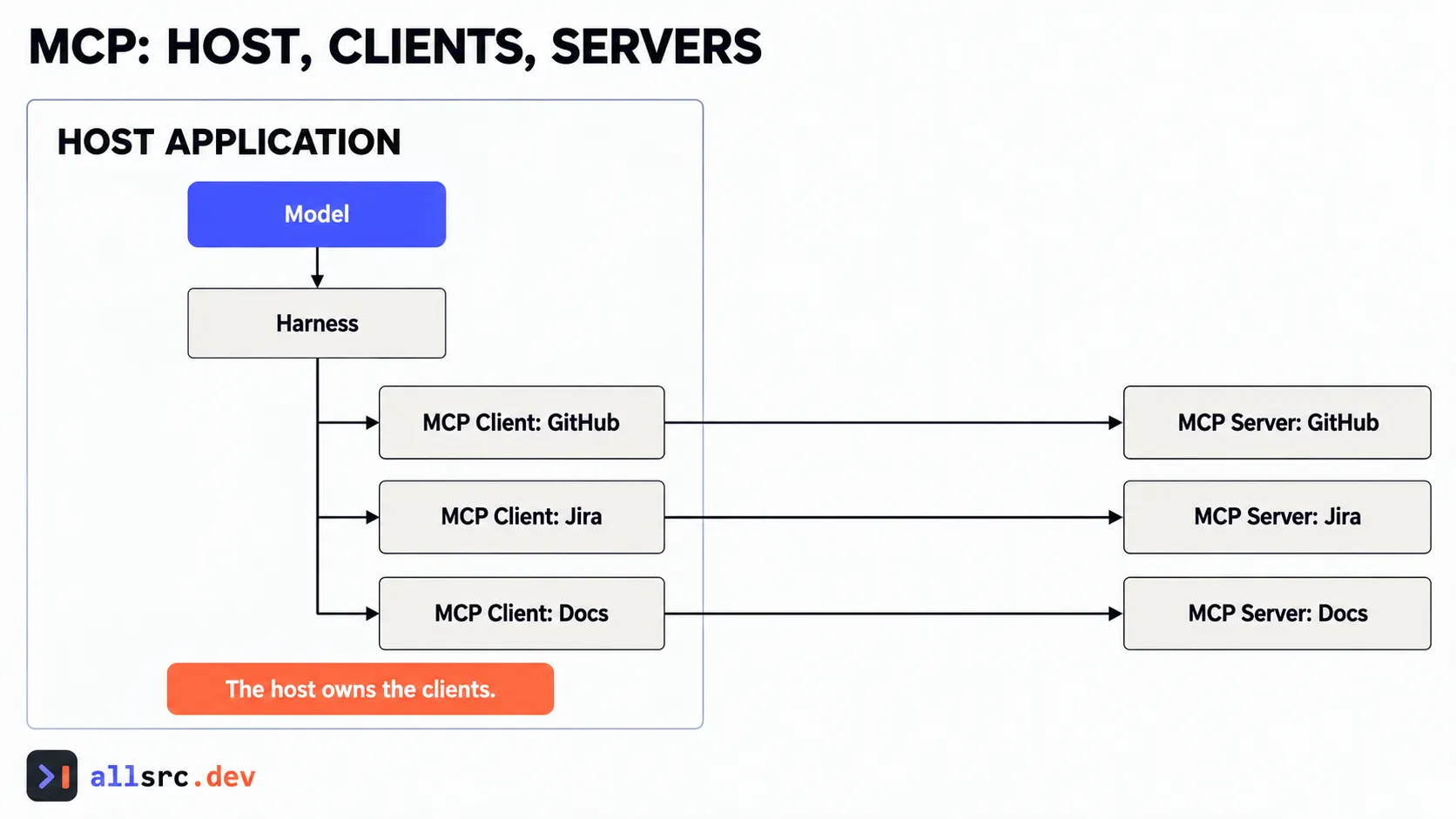 The host owns MCP clients; the model only sees capabilities the host exposes.
Two quick facts. Anthropic created MCP and donated it in December 2025 to the Agentic AI Foundation, a fund under the Linux Foundation co-founded by Anthropic, Block and OpenAI. So it’s no longer one vendor’s protocol. And as of October 2026, the current spec version is 2026-07-28. Check that page rather than trusting my date.
Now back to the question. Why does connecting a server cost anything?
Go back to the request path from Part 2. The model is stateless. The only way it knows a tool exists is that the app sends the tool’s definition in the request, with its name, a description and the schema of its parameters. An MCP server for GitHub can bring dozens of tools. Connect four or five servers and, done the simple way, every one of those definitions goes into every single request, before the first word of your question. Anthropic’s tool search docs describe a typical multi-server setup eating tens of thousands of tokens in definitions alone.
And you know from Part 3 what a crowded context does. Everything gets a little worse. There’s a second effect too. With a long list of similar-looking tools, the model has more chances to pick the wrong one. Anthropic’s docs say tool selection accuracy drops as the list grows.
If you’ve worked with service registries, you know the fix already. You don’t ship the full catalog of every service to every client on every call. You give the client a small index and let it look up what it needs.
One thing a registry never does is read the descriptions and decide. Here the model does that, so how a tool is described affects whether it gets picked.
That’s where the tooling has gone. With tool search, the model starts with one small “search for a tool” capability and a handful of everyday tools. When it needs something, it searches, and only the matching definitions get loaded. Claude Code does this for MCP tools by default now, and the Claude API offers it as a feature you can switch on.
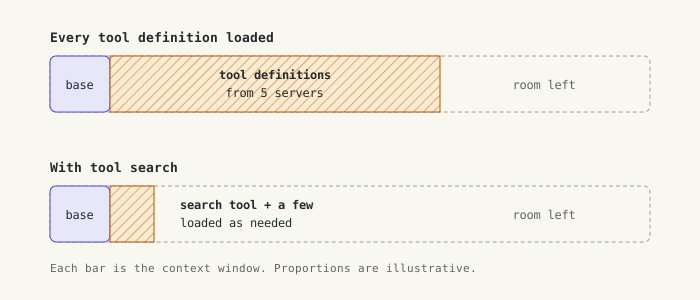
How much of the context is gone before you type a word?
The second approach goes further. Instead of calling tools one at a time and passing every result back through the model, the agent writes a short piece of code against the tools and runs it in a sandbox. If it needs to pull ten thousand rows, filter them and keep five, the ten thousand rows never enter the context. Only the five do. Anthropic wrote this up in Code execution with MCP, and it’s a good read. The trade-off is that you now need a proper sandbox, with limits and monitoring.
When don’t you need any of this? If you have a few small tools that get used on most requests, just send them. And connect the servers this task needs, and leave the rest switched off. Also remember that an MCP server is code you’re trusting, and its tool descriptions go straight into the model’s context. Install one the way you’d install a dependency.
That leaves a design question. If the real cost is definitions sitting in context, is a skill, which loads only when it’s relevant, a better fit than an MCP server for some jobs? Often it is. A skill that says “here’s how we query the billing database, use this script” can do the job of a whole server for one team.
Which brings me to knowledge. Where does an agent actually keep what it knows about you and your project?
There are roughly four places, and you’ve met most of them. Instruction files like CLAUDE.md or AGENTS.md are loaded into every session. Skills sit on disk and load when they’re relevant. Retrieval looks things up when needed, from docs, a search index or a database. And memory is what the agent writes down itself so it’s there next time.
Remember the persist move from Part 3? Memory is that move, built into the product. And under the hood it’s mostly files. Claude Code’s auto memory is a folder of markdown files per project. There’s a short index, MEMORY.md, loaded at the start of every session, and separate topic files that it reads only when it needs them. That’s the same load-on-demand idea as tool search and skills. You can open the folder and read or edit everything it saved.
ChatGPT does it differently on the surface. It has saved memories, things like your name or preferences that it keeps and uses in later chats, and on paid plans it can also draw on your past conversations. You can see and delete what it saved in settings.
So you can sort any piece of knowledge three ways. Is it in the context right now, retrieved when needed, or persisted and loaded back later? Most of the design work is deciding which bucket something belongs in. We’ll go much deeper on retrieval later in the series, and vectors are only one way to do it.
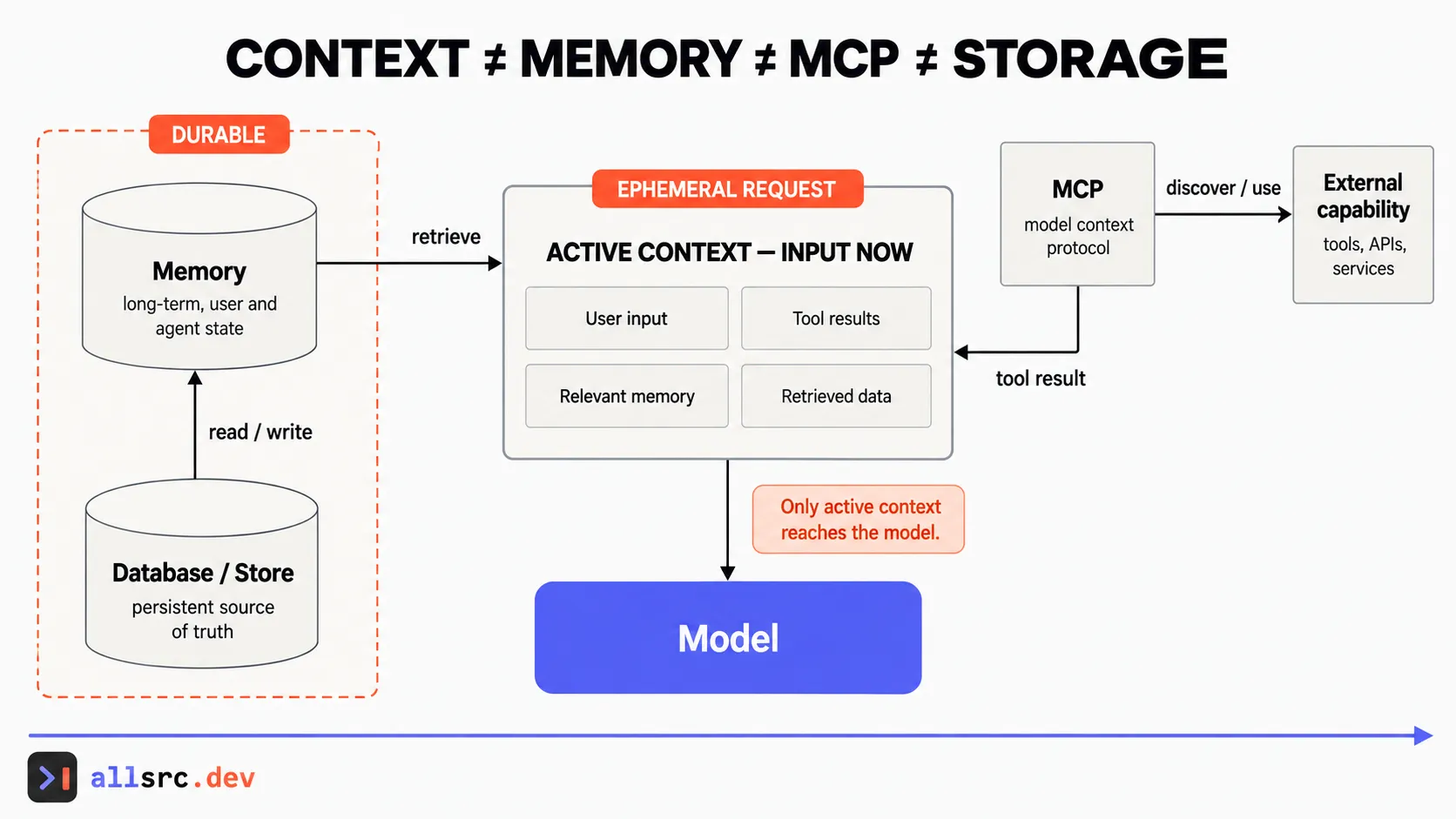 Memory changes model behavior only after relevant information is brought into active context.
One caution before you lean on memory. Anything written to memory comes back in every future session, right or wrong. If something untrusted, like text from a web page, gets saved, it’s now in your context tomorrow too. I wrote about how to keep memory separated by user and run in The Prompt Injection That Waits Until Tomorrow.
Next, subagents, and why the big reason for them is keeping your main context clean.