

If you’ve used a coding agent for a while, you’ve seen this. It stops halfway through a task because it hit a turn limit. Or it runs the same failing command again and again, each time with a slightly different flag, until you step in.
So who decided that limit? And who decided it was fine to try the same thing six times?
Someone else did. Up to now we’ve used other people’s harnesses, like Anthropic’s in Claude Code or GitHub’s in Copilot. In Part 4 we extended them with skills, tools, MCP and subagents, but the loop, the limits and the rules were theirs.
Now say you have a use case that is completely your own. A claims process, an internal support desk, a migration across two hundred repos. You want to decide those things yourself. This is where most enterprises are putting their effort right now.
Why build your own?
The reasons are the ones you’d give for any platform decision. Your domain has rules a general product doesn’t know. Your data has to stay in a certain place. You need deeper integration with your own systems than a plugin gives you. You want control over what the agent may do and when it stops, and over cost per task. And your users may not want a chat window at all.
You have more than two choices. You can use a product as it is. You can assemble on an agent SDK, like the Claude Agent SDK or the OpenAI Agents SDK, which give you a working loop as a library. Or on a managed agent runtime, where the provider runs the loop and the sandbox. Claude Managed Agents (in beta as I write), Amazon Bedrock AgentCore and Microsoft Foundry Agent Service all sit here. Or you can build the loop yourself on the plain model API. Buy, assemble or build, like any other platform.
When shouldn’t you build? When a product or an SDK already does the job and building just sounds more fun. You’d be rebuilding plumbing someone else maintains. Managed runtimes have their own trade-off. Less code to run, but your sessions and state live with the provider, under their pricing and rules. Check that against your data requirements first.
What decides when the agent stops?
Think about it for a moment before reading on.
In Part 2 we saw that the model API is stateless. An agent is that call wrapped in a loop. Anthropic’s tool-use docs describe it roughly like this.
- Send the conversation and the list of tools.
- The model answers and says it wants to call a tool.
- Your code runs the tool.
- Append the model’s request and the tool’s result to the conversation and send the whole thing again.
- Repeat while the model keeps asking for tools.
A while loop around a stateless call. The research name for this think, act, observe cycle is ReAct, from a 2022 paper. And from Part 3, every pass adds to the context, so a long loop gets slower, costlier and eventually worse.
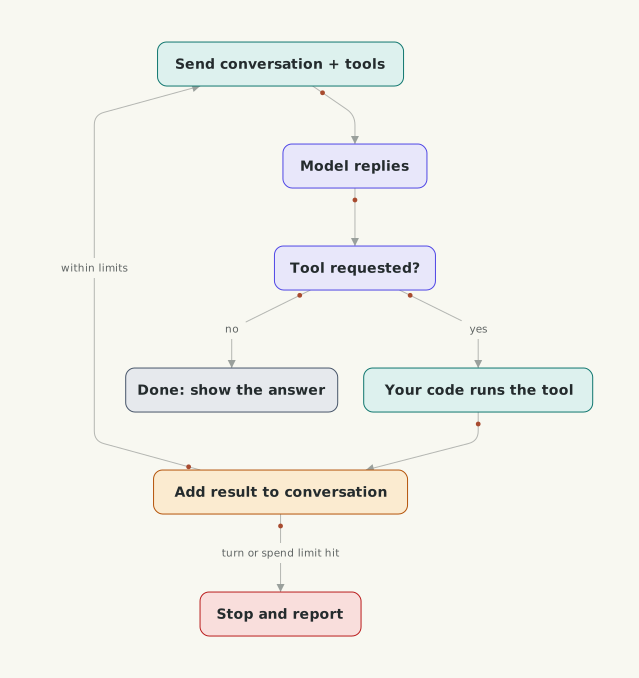 What keeps the loop going, and what makes it stop?
So the answer is your code. The model decides when it thinks it’s done. Your loop decides when it actually stops. Anthropic’s Building effective agents says it’s common to add stopping conditions, such as a maximum number of iterations. The SDKs bake this in. The Claude Agent SDK has a maximum number of turns and a maximum spend, and the OpenAI Agents SDK raises an error when a run passes its turn limit.
People now call this loop engineering. Anthropic’s Claude Code team describes loops as agents repeating cycles of work until a stop condition is met. Most of the design is in that stop condition. What counts as done, and when should it stop even if it isn’t?
You know this from distributed systems. A doom loop is a retry storm. The model sees an error, tries a small change, gets the same error, and keeps going, because each attempt looks reasonable to it. A turn cap is a timeout. You also want something like a circuit breaker, so the same call failing the same way trips the loop. I wrote about that in The Retry Loop Your Circuit Breaker Cannot See.
Two more habits matter. Feed the real error back to the model, the actual stack trace. And don’t trust the model’s own “done”. Check it with the tests or a linter. Anthropic calls this getting ground truth from the environment at each step, and my post I’ve Fixed The Failing Test Is A Claim, Not A Completion Signal goes into it.
Caps on turns and spend are also safety controls. A runaway agent with write access to production is a security problem as much as a cost one.
Workflows or agents?
If you could draw the flow on a whiteboard before it runs, why let the model decide it at runtime?
Back in 01b we split the two. In a workflow your code sets the path and the model fills in steps. An agent picks its own next step. Anthropic’s post lists five workflow patterns, and most real systems use one or a mix.
| Pattern | What it does | Use it when |
|---|---|---|
| Prompt chaining | each call works on the previous one’s output | the task splits cleanly into fixed steps |
| Routing | classify the input, send it to a specialised path | there are distinct categories handled differently |
| Parallelization | run independent pieces at once, or the same task several times and vote | you want speed, or more than one attempt |
| Orchestrator-workers | one model splits the task and hands parts to workers | you can’t predict the subtasks in advance |
| Evaluator-optimizer | one call writes, another critiques, in a loop | you have clear criteria and refining helps |
Think of it as a spectrum. Plain code, then a single model call, then fixed workflows, then an agent choosing its own steps. Each step along buys flexibility and costs latency, money and predictability. A workflow behaves like a job in a workflow engine, easy to trace and test. An agent is closer to an event-driven service whose next move you only see at runtime.
My rule comes from a line in Microsoft’s Agent Framework docs that I quoted in 01b, “If you can write a function to handle the task, do that instead of using an AI agent.” If you can’t write the function but you can draw the steps, build a workflow. Use an agent when the steps genuinely can’t be known up front, like debugging, and then give it hard limits and real checks.
One thing I’ve left out. A loop that runs for an hour will crash at some point, and a tool that charges a customer must not run twice after a restart. That’s durable execution, and I cover it in The Retry That Paid The Invoice Twice.
Next, a step back to how you design these things, because a model in the loop is still software engineering. After that, what you build it all with. Frameworks, runtimes, graphs, and where your agent’s state lives.