

You’ve probably tried this. You ask ChatGPT or Copilot Chat how your team rotates the keys for the payments service. It gives you a tidy, confident answer. Five steps, a script name, a config flag. None of it is how your team does it. The script doesn’t exist. The real steps are on a wiki page that someone updated last month.
The model isn’t broken. It just has never seen that page.
So before reading on, think about it as an engineer. How would you fix this?
Most people get there quickly. Find the right wiki page and give it to the model along with the question. That’s the whole idea behind RAG, retrieval-augmented generation. Retrieve the relevant material, put it in the request, and let the model answer from it.
Why it doesn’t know
A model knows what was in its training data, and that data stops at a date. Anthropic’s model page, for example, lists a knowledge cutoff for each model. And your internal wiki, runbooks, tickets and customer data were never in the training data at all.
Remember grounding from Part 3. Give the model the real source and ask it to answer from that. Retrieval is grounding done automatically. Your code finds the source for each question and sends it. And from Part 2 you already know where it goes. Retrieved documents are data, so they go in the user message, wrapped and labelled, never promoted into the system prompt.
There’s a bonus. If you send the pages, the model can cite which page each part of the answer came from, and the user can check.
Why not just paste everything?
Context windows are huge now. Some current models take a million tokens. So why not put the whole wiki in every request?
If your knowledge is small, do exactly that. Anthropic’s own guidance says that if your knowledge base is under about 200,000 tokens, roughly 500 pages, you can just include all of it in the prompt. No search, nothing to maintain.
For anything bigger, go back to Part 3. Every token is sent and paid for on every request, a big request is slower to start answering, and the one paragraph that matters gets lost in the middle. A long window is a useful tool. It doesn’t replace picking the right ten pages.
So how would you find the right pages?
Most tutorials jump straight to embeddings and vector databases here. That’s one way among several, and you’ve built search before.
Keyword search. The classic one is BM25, a ranking formula on top of an inverted index, the thing Elasticsearch and Lucene have done for years. It’s very good at exact matches. Anthropic’s retrieval write-up gives the example of an error code like TS-999. A keyword search finds that exact string. A meaning-based search may bring back pages about error codes in general.
Structured lookups. Some questions aren’t document questions at all. “Who is on call for payments?” is a query against your on-call system. “What’s the status of order 4471?” is an API call. Give the model a tool (Part 4) and let it look the answer up. Don’t index a copy of data that already lives in a database.
Agentic search. Watch Claude Code work on a repository. It doesn’t have an index of your code. It searches files by name pattern, searches their contents, opens the promising ones, and repeats until it has what it needs. Its creator, Boris Cherny, has said early versions used a local vector database, and agentic search worked better and was simpler, with fewer problems around security, privacy and staleness. It takes more model calls than one search, and it always reads the live code.
Vector search. An embedding model turns a piece of text into a long list of numbers, so that texts with similar meaning end up close together. You store those vectors and, for each question, find the nearest ones. This is how a page that says “credential rollover” turns up for a question about “rotating keys” without sharing a single word. The cost is a pipeline to keep fresh. You split documents into pieces, embed and store them, and re-embed when they change.
Hybrid. In practice, many teams run keyword and vector search together, merge the two result lists, and often re-rank the top results with a second model. You get the exact matches and the meaning matches. If you want the details of splitting documents, hybrid search and re-ranking, Anthropic’s Contextual Retrieval post is a clear walkthrough.
| Approach | Good at | Reach for it when |
|---|---|---|
| Keyword (BM25) | exact terms, codes, names | people search with the words in the docs |
| Structured lookup | live facts | the answer is in a database or behind an API |
| Agentic search | files that change all the time | a codebase or a folder the agent can read |
| Vector search | meaning, different wording | users phrase things differently from the docs |
| Hybrid | both | keyword or vector alone keeps missing |
Embeddings aren’t only for text either. Google’s Gemini Embedding 2 maps text, images, video, audio and PDFs into one shared space, so a text question can find a diagram, a screenshot or a clip of a recorded call. Hold on to that thought for the next article.
Curated knowledge an agent can browse
In June 2026, Google Cloud published the Open Knowledge Format, OKF. It’s a directory of Markdown files. Each file describes one thing, like a table, a metric, an API or a runbook, with a little YAML at the top saying what type of thing it is. Index files list what’s in each folder, and the files link to each other. Google describes it as a formal version of Andrej Karpathy’s LLM wiki pattern. It’s just files. No SDK, no account, and you can keep it in Git next to your code.
You’ve seen this shape in the skills from Part 4. The agent reads a short index, follows a link to what it needs, and never loads the rest. No similarity search, just curated pages browsed the way you would.
It’s young. Version 0.2 came out in July and added fields for where a page came from, who verified it and when it goes stale. I’d treat it as a pattern worth understanding and wait before calling it a standard. It also won’t replace search over a huge pile of raw documents. Many systems will use curated pages for what must be right and search for the rest.
Who is asking?
Here’s a question that catches a lot of first RAG projects. Your wiki has pages only HR can see. You index everything into one search store. A developer asks about salary bands. What comes back?
Unless you planned for it, the HR page does. The search store doesn’t know who is asking. So the permission check belongs inside the query, filtering by the user’s access before anything reaches the model. I wrote about this in Your RAG Pipeline Does Not Know Who Is Asking.
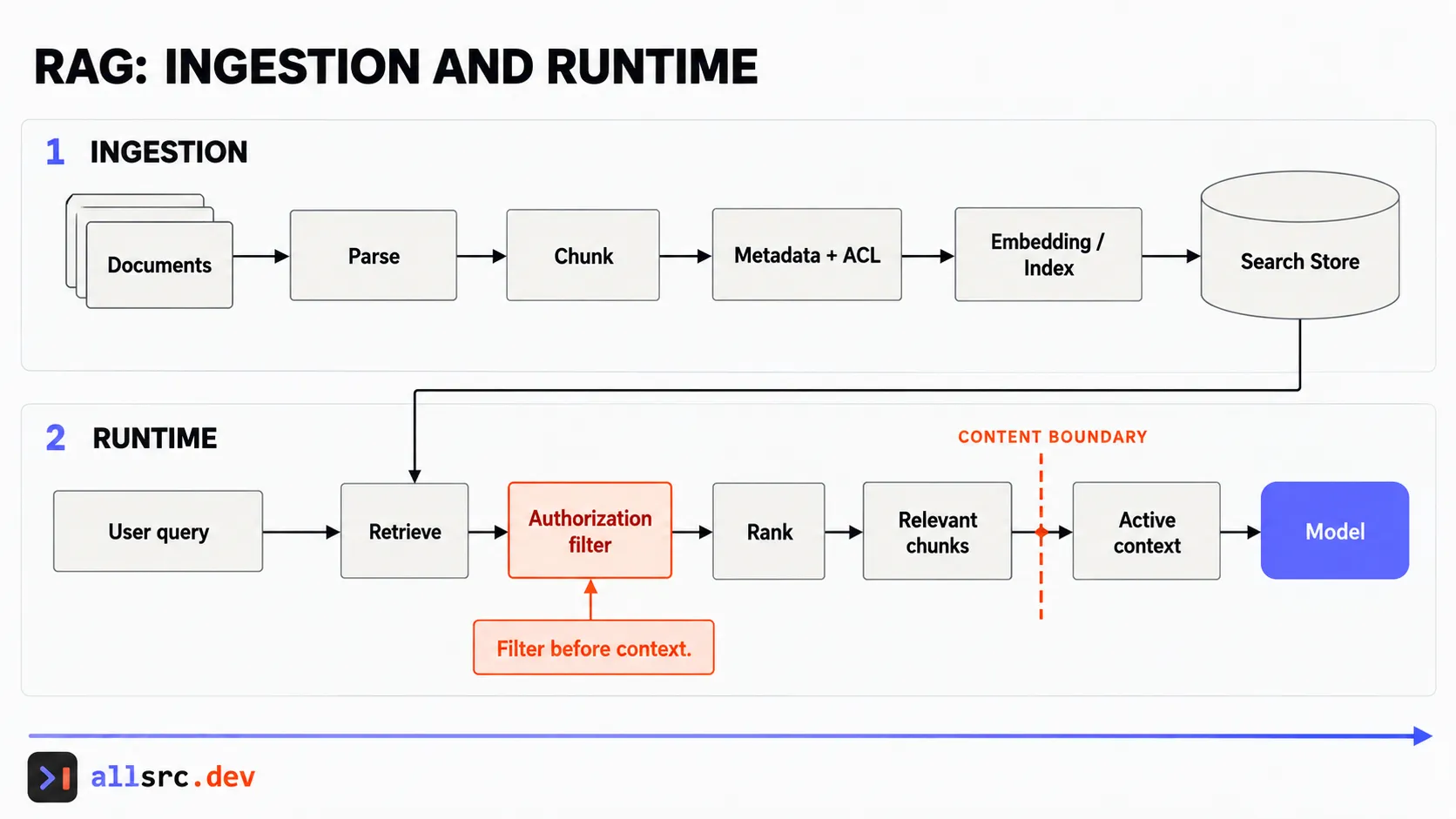 Retrieval is only safe when access filtering happens before content reaches the model.
Memory is the agent writing
Everything so far reads knowledge someone else wrote. Memory, from Part 4, is the agent writing knowledge for itself. A preference, a decision, a fact about your project, saved so it’s there next time.
That turns it into a write path, with all the usual questions. What’s worth storing? When does an old entry get updated or deleted? And what if something wrong gets saved, or something planted by a web page the agent read? It comes back in every future session. My post The Prompt Injection That Waits Until Tomorrow covers how to keep memory separated.
How I’d choose
Start with the simplest thing. If it fits, paste it in. If it’s code, let the agent search the files. If it’s in a database, give the model a query tool. Use keyword search for documents, and add vectors when you see it miss questions that are worded differently from the docs. Before you change anything, write down ten real questions and which page should answer each one, like the small test set from Part 4. Then you’ll know whether a change helped.
Next, it isn’t always text. Images, voice, and a call centre end to end.