

If you’ve used Claude Code for a while, you’ve seen it. You’re an hour into a task, the tool pauses, says it’s compacting the conversation, and then carries on. Most of the time nothing seems different. But sometimes, after that, it has forgotten something you told it early on. A file you said not to touch. A decision you made together forty minutes ago.
So what is actually going on there?
Go back to the article on the model and the application. I said the app decides how much of your old conversation to send to the model each time. That’s the key. The model remembers nothing between calls. Every time you send a message, the app sends the whole conversation again. The hidden system prompt, every earlier message, every reply, every file it read, every tool result, and the definitions of the tools it can use. All of that together is the model’s context.
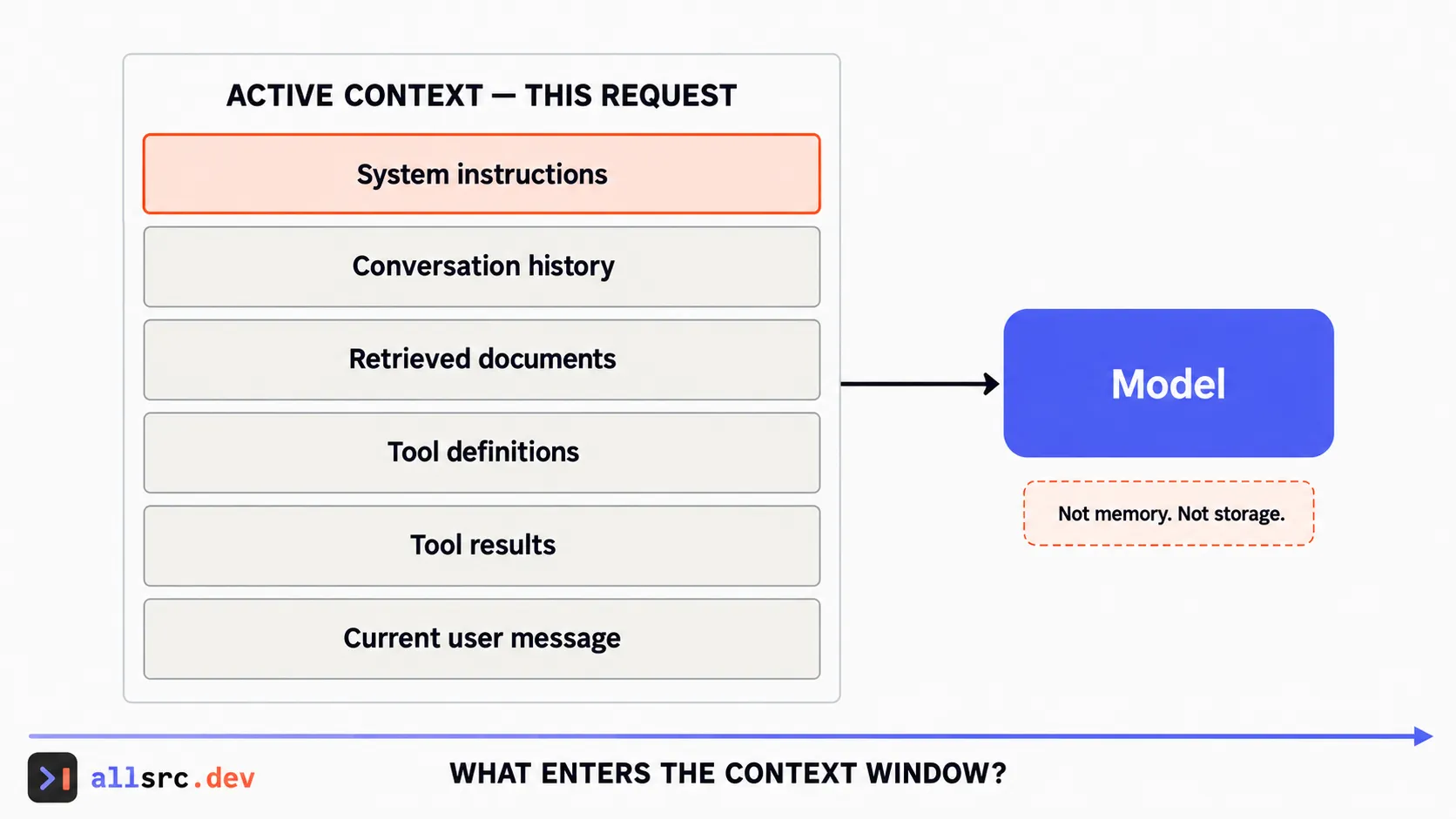 The context window is the complete working input presented on this request.
If you’ve built stateless HTTP services, this will feel familiar. The client sends the full session in every request body, so as the session grows, the request grows.
And in a coding session it grows fast. You ask one question, and to answer it the agent reads three large files and runs the tests. All of that goes into the conversation and gets sent again on every turn after. Context builds up turn by turn.
Context is measured in tokens. A token is a chunk of text the model works with, often a piece of a word. OpenAI’s rule of thumb for English is that a token is about three quarters of a word. Code, other languages and odd strings usually take more. Tokens are what you pay for, and they are also what the limit is counted in.
That limit is the context window. It is how many tokens the model can take in a single request, and the reply it writes counts too. It works like a maximum request size. Every model has one, and the sizes change often enough that I’d rather point you to the provider’s model page than quote numbers here.
Now, what should the app do when the conversation gets close to that limit?
It has roughly three options. It can fail and tell you the conversation is too long. It can quietly drop the oldest messages, a bit like a rolling log. Or it can summarize. It asks the model to write a shorter version of the older part of the conversation, throws the original away, and carries on with the summary plus the recent turns.
“Compacting conversation” is that third option. It’s a harness feature, something the application does around the model. The model never decides to compact on its own. Claude Code does it automatically when you get near the limit, and you can also run /compact yourself and tell it what to keep, for example “focus on the test failures and the code changes”. Providers now offer the same thing in their APIs. Anthropic, for example, has server-side compaction, so if you build your own app the platform can do the summarizing for you.
And summaries lose detail. That’s the whole story behind the forgotten instruction. Something you said once, early, in passing, is exactly the kind of thing a summary drops. If you want to see how this looks from the harness side, and why losing a “the user said no” line is worse than having no summary at all, I wrote about it here: Context Rot: When Your Agent Forgets It Was Denied.
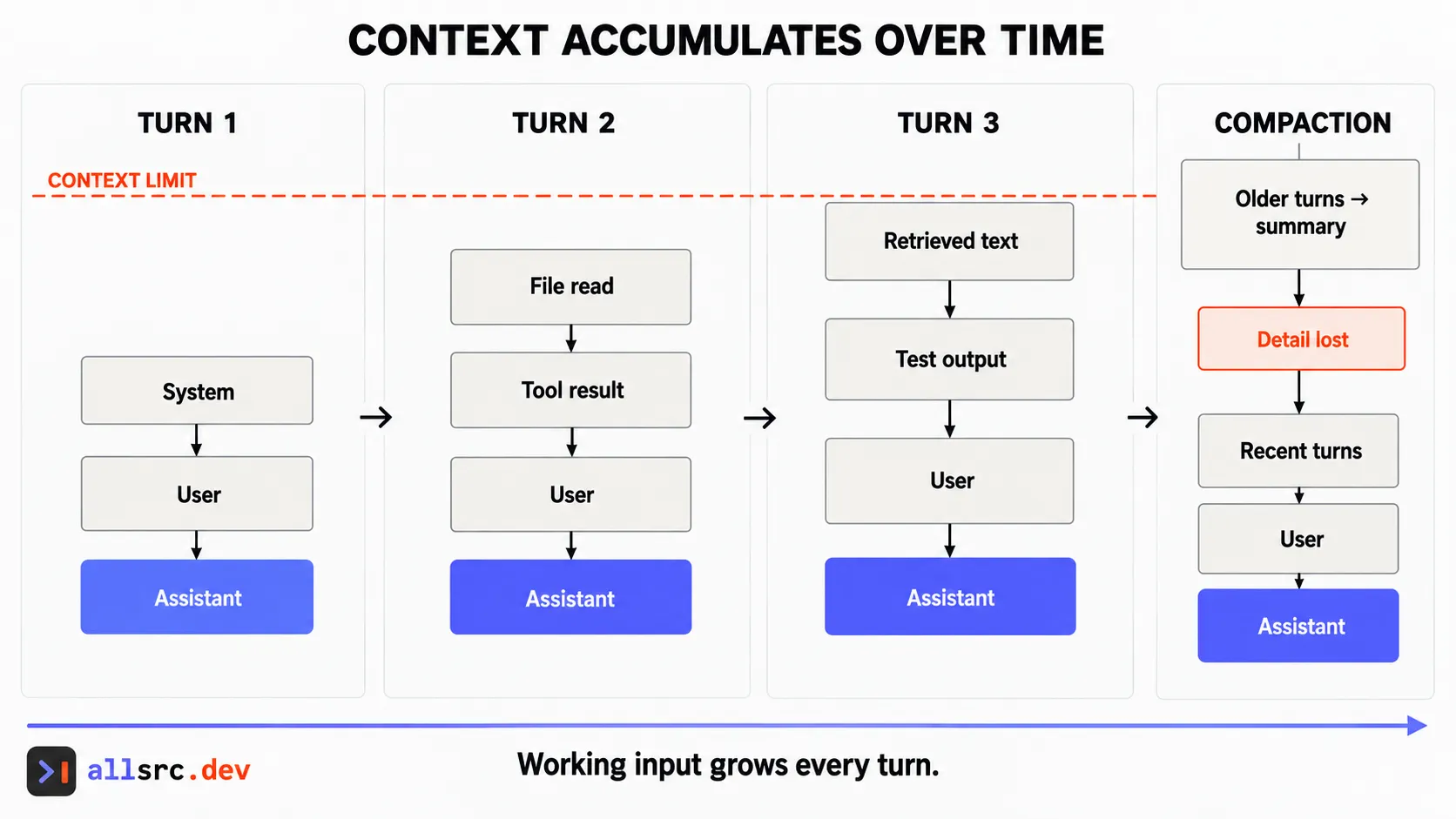 Each turn resends more working context until the harness must prune or compact it.
Here’s a question for you before you read on. Even before compaction kicks in, a very long chat often gets worse. The answers get vaguer, it repeats a mistake you already corrected, it follows an old instruction instead of the new one. Why do you think that happens? There’s plenty of room left in the window.
The window is not a box where everything inside is equally visible. The model has to pay attention across all of it, and the more there is, the thinner that attention gets. Anthropic calls this context rot in its docs: as the token count grows, accuracy and recall go down. They describe the context as an attention budget that every extra token spends a little of.
Where the detail sits matters too. A well-known 2023 study, Lost in the Middle, found that models did best when the relevant information was near the start or the end of a long input, and noticeably worse when it was buried in the middle. Your important instruction from an hour ago is now in the middle, under thirty file reads and test logs.
Then there’s the conversation itself. Long chats collect stale instructions. You said “use the old API” at the start and “actually, use the new one” later. Both are still in the context, and now the model has to work out which one wins. Add old tool output that no longer matters, and a lot of what the model reads on every turn is noise.
This is why a bigger window didn’t fix the problem. Windows have grown a lot, and that helps you fit more in. It doesn’t make the model equally sharp across all of it.
It’s also why I’d say the context window is not memory. Memory is something you’d expect to keep, organise and look up. The context window is just what gets sent on this one request. When the conversation ends, it’s gone. When it’s compacted, parts of it are gone. Anything that must survive belongs somewhere outside the conversation, like a project instructions file, a spec, or your notes. We’ll come back to that properly when we get to memory.
So what do you do with this, day to day?
When you start an unrelated task, start a fresh chat, or run /clear in Claude Code. A short, clean context usually works better than a long one full of things that no longer matter. When you’re in the middle of something and continuity really matters, compact, and say what to keep. And don’t rely on compaction to hold rules that must never be broken. Put those in a file the app loads every time.
One security point, even this early. Whatever lands in the context, the model reads, including a web page or file the agent pulled in. It sits right next to your instructions, so be careful what you let in.
Next, a slightly surprising one: what actually happens when you switch models halfway through a chat, and why it can suddenly feel slower and cost more.